Building on Palantir: the OSDK, Developer Console and MCP

What gets built inside the platform, what gets built outside, and what you keep in each case
Quick Answer
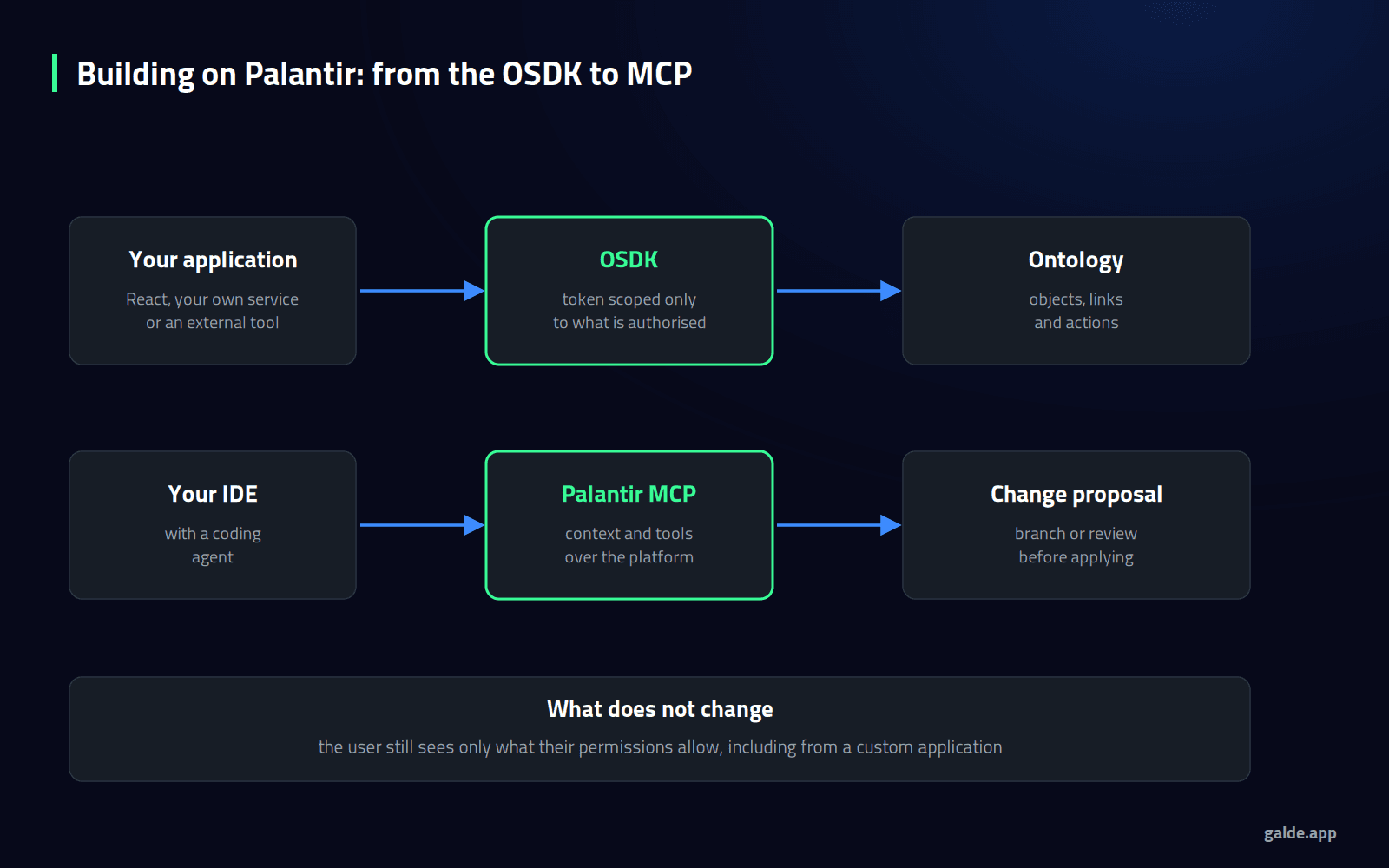
Not everything done with Palantir is built inside Palantir. The Ontology SDK lets an application of yours — React, your own service or an external tool — read and write against the same objects and actions, with a token scoped to what is authorised and respecting the user's permissions.
Around it sit three more pieces: the Developer Console, where those applications are generated and managed; the platform APIs, for datasets, orchestration, connectivity and administration; and Palantir MCP, which connects an IDE or a coding agent to the platform's context and tools.
The rule we apply: inside, whatever benefits from the model and the permissions; outside, whatever is product of your own. And in both cases, the logic lives in your repositories.
The Ontology does not force you to use its screens. It forces you to respect its permissions.
As soon as a deployment moves past the first process, the engineering team asks: do we have to do everything with the platform's tools? The short answer is no. The useful answer is knowing what you gain and lose at each boundary.
Building outside is not stepping out of the model. It is using it from somewhere else.
The Ontology SDK
The Ontology SDK treats the platform as a backend: your application queries objects, follows links and runs actions with the same guarantees as a screen built inside. Two properties matter especially:
- Scoped token: the application only reaches the Ontology entities it has been authorised for, on top of the user's own permissions.
- Row and column controls: they filter what the user can read, but the documentation warns that they do not extend to what the application does with that data afterwards, and recommends pairing them with markings or classification. It is the same distinction we explain in data governance in Foundry.
The SDK ships through the usual package managers, so the team works with its own tooling and lifecycle.
The Developer Console and the APIs
The Developer Console is where OSDK applications are created, the entities they will use are selected and the authentication clients are managed. Alongside it, the developer toolchain documents the platform APIs for datasets, filesystem, administration, orchestration, connectivity and SQL queries, plus compute modules, which let you bring your own code or a model in a container and run it inside.
That last piece is usually what unblocks the hard cases: a proprietary model, a specific library, or a process nobody wants to rewrite.
Palantir MCP: When the Coder Is an Agent
Palantir documents its own implementation of the Model Context Protocol, Palantir MCP, which gives an IDE or a coding agent two things: context about your repository and the platform's architecture, and tools to explore the Ontology, search documentation or act on projects.
It is the same idea as AI FDE inside the platform, which proposes its changes in a branch proposal or a pull request for someone to approve. And there lies the practice we recommend to clients: let the agent propose and a person review, using the same branch and review flow you already use for code.
Inside or Outside: How We Decide
- Inside when the value is in the model and the permissions: operational screens for internal users, flows with governed actions, cases that will change often with the business.
- Outside when it is product of your own: a customer-facing application, a very specific interface, or something that must live in your deployment cycle.
- Always outside: the source code of transformations and functions, versioned in your repositories. It is one of the practices that reduce dependency, as we detail in avoiding Palantir lock-in.
Four Mistakes We See in Engineering Teams
- Reimplementing permissions. If the application queries with a service identity and filters afterwards, you have created a hole.
- Copying objects into your own database "for performance", and ending up with two models that diverge.
- Hiding rules in the interface, where they cannot be reused or migrated later.
- Letting the agent apply changes without review, which is fast until the day it is not.
Does your team want to build on the Ontology without being locked into its screens?
At Galde we deploy Palantir Foundry in multinational corporations and also design the part built outside: OSDK applications, API integrations and the repository and review discipline that keeps control in your team.

How Galde Can Help
Through our Palantir consulting and implementation, we decide with you the boundary between what is built inside and what is built outside, and we build both parts.
Through data platforms, we integrate those applications with the rest of your architecture and its deployment cycle.
And through generative AI, we define how coding agents work in your environment: what they may propose, who reviews and what gets recorded.
Conclusion
Building on Palantir does not mean living inside its screens. The Ontology SDK and the platform APIs let you build your own product on the same model and the same permissions, and MCP brings that work closer to the coding agents your teams already use. What does not change on either path is the discipline: the user's permissions, code in your repositories, and human review before a change is applied.
Palantir®, Foundry® and AIP® are trademarks of Palantir Technologies Inc. Galde is not an official Palantir partner and is not affiliated with the company; we implement the platform for our clients.
Frequently Asked Questions
What is the Palantir OSDK?
An SDK that gives access to the Ontology from your development environment, treating the platform as a backend: reading objects, following links and running actions with a token scoped to what is authorised and respecting the user's permissions.
Can you build customer-facing applications?
Yes, with the OSDK and the platform APIs. It is worth reviewing the permission model carefully and pairing row and column controls with markings, because those controls do not extend to what the application does with the data.
What does Palantir MCP add?
It gives an IDE or coding agent context about the repository and the platform, and tools to explore the Ontology or act on projects. It speeds up the developer without taking them out of their environment.
Is it safe to let an agent modify the platform?
With review, yes. Both MCP and AI FDE fit a flow where the agent proposes changes in a branch or a pull request and a person approves them before they are applied.
Can I run my own code or model inside the platform?
Yes. Compute modules allow containers with your own code or a custom model to be deployed and integrated into platform workflows.